AI-Enhanced Attacks
See how attackers use AI for malicious software, convincing messages, and fake voices, then practise checking the request behind the disguise.
An attacker can use an AI tool to work faster. The target may be a person, an account, or an ordinary computer system. The target does not need to use AI.
This page contains original explanations and fictional practice cases for Task 3 of AI Security Threats.
AI can help an existing attack
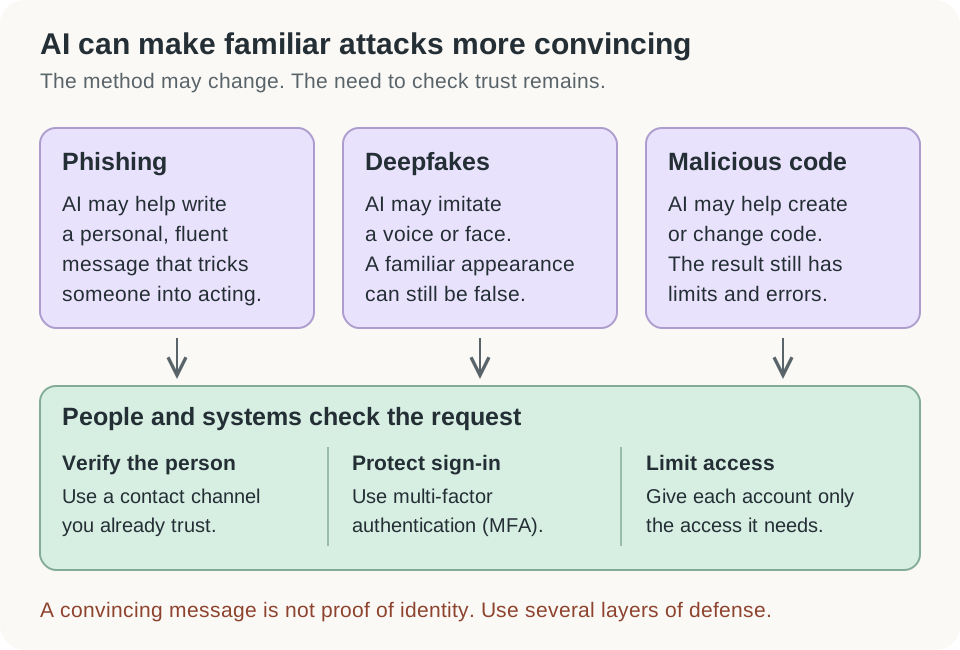
Open the diagram for a larger view.
AI-enhanced means AI helps with part of the work. It does not mean the whole attack runs by itself.
In its May 2025 assessment, the UK’s National Cyber Security Centre described AI use for research, social engineering, basic malware generation, and processing stolen data. Its assessment to 2027 expected existing attack methods to become more effective. This is a dated assessment, not a guarantee about every attacker or tool. NCSC: impact of AI on cyber threats to 2027.
For a defender, a useful question is: What harmful action is this person trying to make happen? Finding the exact AI tool is often less urgent than preventing that action.
1. Malicious software: quicker drafting and changes
Malware is software designed to cause harm. It might steal information, damage files, or let someone control a device without permission.
AI can help a person explain code, produce a draft, or suggest changes. Those abilities can also assist malware development. But a generated program can still contain errors. Writing code is only one part of reaching a target and achieving an attacker’s goal. NCSC’s assessment also expects human skill to remain important in advanced attacks. NCSC assessment.
Imagine a fictional employee receives a file called “meeting viewer.” Its message says the employee must run it to join a meeting. Whether a person or an AI wrote that file, the important decision is the same: should this unexpected program be allowed to run?
Useful layers include approved software sources, restricted installation permissions, current security updates, and monitoring unusual behavior. A filename and a familiar logo do not tell you what a program actually does.
The lesson is not to memorize what “AI malware” looks like. It is to check the source, the requested action, and the program’s behavior.
2. Phishing: good English does not prove trust
Social engineering means manipulating people into doing something useful to an attacker. Phishing is one form: a deceptive message tries to obtain information or cause an unsafe action. Spear phishing targets a particular person or group.
AI can help produce fluent messages in different languages and adapt a message to its audience. A well-written message can therefore still be malicious. NCSC highlighted this problem in its January 2024 threat assessment. NCSC: the near-term impact of AI.
Here is an original teaching example:
The design review has moved. Open the attached viewer and sign in before the meeting. Please do this now so the team is not delayed.
There are no spelling mistakes. The useful clues are the unexpected attachment, the login request, and the pressure to act quickly.
Ask what you already know. Was a meeting change expected? Does the real calendar show it? Can the organizer confirm through your normal contact channel? Open the service through a saved bookmark or known app instead of using an unexpected message’s link. The FTC recommends checking with the organization using contact details you already trust. FTC: recognizing phishing.
3. Deepfakes: a familiar face or voice can be copied
A deepfake is AI-generated or AI-altered media that can make a person appear to say or do something they did not. Voice cloning imitates someone’s voice.
Consider an invented workplace case. A caller sounds like a manager and asks an employee to change a supplier’s payment details. The voice creates familiarity. The request creates the risk.
The employee should verify the request through the normal approval process and an independently known contact method. Calling the number supplied by the caller would keep the check inside the attacker’s story.
The FTC warns that scammers can imitate a family member’s voice using voice-cloning tools. It advises slowing down and contacting the person through a number known to be correct. FTC: fake emergency scams.
Strange audio or video can be a clue. Clear audio or video is not proof of identity. A useful check should establish who authorized the action, not just whether a recording looks convincing.
Match the request to a defense
These are original study examples, not results from the TryHackMe activity.
| Situation | What needs protection? | A useful response |
|---|---|---|
| A message asks you to run a new viewer | Your device and its files | Check the real meeting instructions and use approved software |
| A caller asks for an urgent payment change | The payment process | Verify through the established contact and approval process |
| A message asks for a login code | Your account | Do not share the code; use the service’s normal support route |
Notice that each response still works when you cannot prove AI was involved. You can identify an unsafe request without identifying its authoring tool.
Check your understanding
A message uses your correct name and perfect English. Is it safe?
No. Those details may be available to an attacker. Check the request, the destination, and the sender through a trusted route.
A familiar voice asks you to bypass a normal approval. What matters most?
The request needs independent verification. A familiar voice does not authorize a payment, password reset, or access change.
Must you prove that an email was written by AI before reporting it?
No. Report the suspicious behavior through your organization’s normal process. The immediate concern is the attempted harm.