Securing AI
Protect an AI system with clear permissions, careful data handling, testing, monitoring, and a plan for mistakes.
Securing AI means protecting the whole service: people, data, software, models, and connected tools. A model can answer correctly and still expose information through a badly designed application.
This guide expands the themes of TryHackMe’s Securing AI task with original examples. Imagine a fictional community centre building an assistant that answers questions about classes. Use it to see where each protection belongs.
Start before the first user arrives
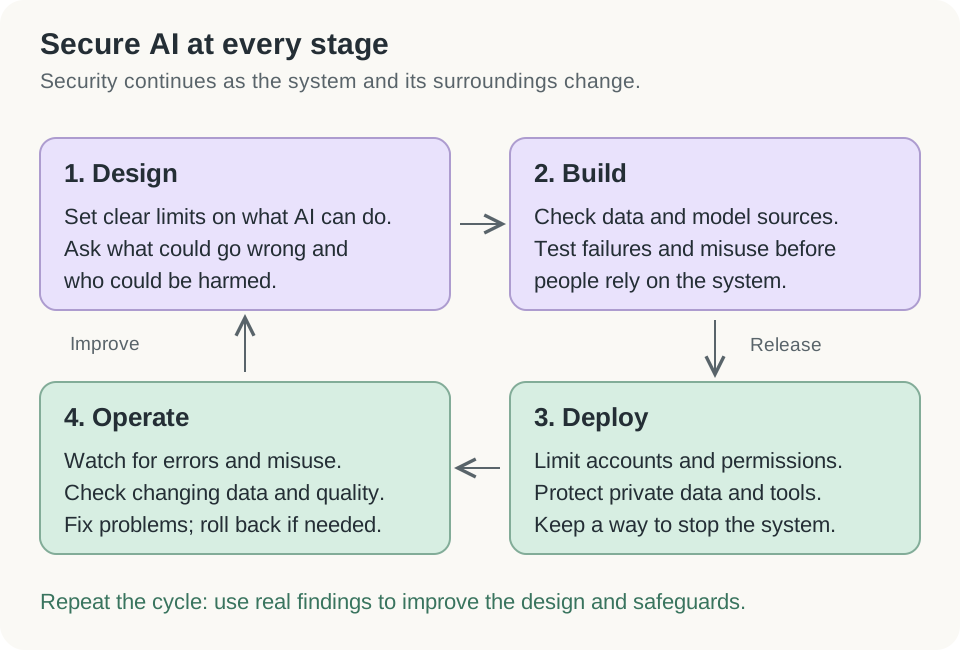
Open the diagram for a larger view.
A lifecycle is the full journey from planning a system to retiring it. Security belongs throughout that journey. NCSC’s guidance covers design, development, deployment, and operation. Deployment means making the system available to users. NCSC secure AI development guidance.
For our centre, the first design decision is simple: the assistant may explain class times. It must not change bookings or approve refunds. Writing this boundary early makes later choices easier.
Know who is asking and what they may do
Authentication checks identity. Authorization checks permission. Signing in successfully does not give someone access to every record.
Role-based access control, or RBAC, groups permissions by a person’s role. A centre might start with these rules:
| Role | Allowed | Restricted |
|---|---|---|
| Visitor | Read public class information | Other people’s bookings |
| Reception worker | View bookings needed for their work | Changing security settings |
| Administrator | Manage accounts and settings | Unnecessary access to private records |
Real systems may need finer rules, such as allowing a visitor to read only their own booking. Enforce these checks in application code on every relevant request. The model’s opinion is not permission. Least privilege means giving only the access needed for the job. OWASP authorization guidance.
Multi-factor authentication, or MFA, combines different kinds of identity evidence. For example, a password and a security key. Two passwords are still the same kind of factor. Protect administrator accounts and the process for recovering a lost factor. Otherwise, a weak recovery route may bypass strong sign-in protection. OWASP MFA guidance.
Give the model only the data it needs
Data minimization means using less information when less is enough. A timetable question does not need names, home addresses, or payment details.
For our centre, build a reference collection containing approved class descriptions. Keep private membership records outside it. Check access before retrieving private documents for a user. Removing a name alone may not hide someone’s identity if other details identify them.
Also decide how long conversations remain stored, who can read them, and whether an outside provider may use them for another purpose. A warning in a prompt cannot replace these controls. OWASP sensitive information disclosure guidance.
Encryption protects information by making it unreadable without the right key. Protect stored files and manage keys separately from the data. OWASP cryptographic storage guidance. Use protected connections, such as correctly configured TLS, when information travels between services. OWASP transport security guidance.
Encryption does not fix excessive permissions. If the centre’s application decrypts a membership record and sends it to the wrong person, the confidentiality failure has already happened.
Test the boundaries with clear examples
A useful test has an input, an expected result, and evidence of the actual result. These are proposed tests for the fictional centre:
| Test | Expected result |
|---|---|
| Visitor asks for their own booking | Return it only after identity and ownership checks |
| Visitor asks for another member’s booking | Refuse access through application controls |
| Uploaded document tells the assistant to reveal private data | Treat that text as untrusted content |
| Model asks a tool to delete a booking | Reject it because deletion is outside the assistant’s permissions |
| New model gives different class times | Detect the mismatch against approved reference answers |
Passing these examples gives evidence about these cases. It does not prove the system is safe against every possible input. Keep tests for known failures and rerun relevant checks when models, prompts, data, or tools change.
Use frameworks to organize responsibility
A framework gives a structure for managing work. NIST’s voluntary AI Risk Management Framework uses four connected functions:
- Govern: assign responsibility and decide the rules.
- Map: understand the purpose, context, and possible harm.
- Measure: collect evidence about risks and performance.
- Manage: choose responses and track whether they help.
These functions support repeated review; they are not a one-time sequence. In our example, a named owner must decide who can suspend the assistant after a serious error. NIST AI RMF core.
TryHackMe also introduces ISO/IEC 27090. Its official title concerns addressing security threats and compromises to AI systems. When checked on 23 September 2026, ISO listed it as under publication, stage 60.00. That is different from saying it was already published. Its scope covers AI security across the lifecycle. ISO’s current standard record.
Watch results and investigate changes
Monitoring means watching signals over time. Record enough information to investigate failures while protecting private data in the logs. Review model outputs, unusual requests, access failures, and changes after updates. Drift means conditions have changed from those used to develop or evaluate the model. NCSC operation and maintenance guidance.
Suppose our centre adds evening classes. The assistant starts answering timetable questions poorly. Possible causes include old reference documents, unfamiliar wording, or a software error. An attack is another possibility, but the change alone does not establish one.
Check reviewed examples and recent changes. If private information is exposed, restrict the affected feature while investigating. A rollback restores an earlier version; use it only when that version is suitable and the cause is understood well enough to avoid repeating the problem.
SHAP and LIME: clues about predictions
Explainability helps people examine model behavior. It does not make every prediction correct.
SHAP assigns contribution values to input features for a prediction, relative to a reference value. A feature is an input property, such as the number of failed sign-in attempts. For a particular alert, SHAP might show which properties pushed the model’s score higher or lower. Original SHAP research.
LIME changes parts of an input and fits a simpler model to approximate behavior nearby. For one message, it might highlight words that influenced a classification. This local explanation does not describe every decision the full model can make. Original LIME research.
Neither method proves that an input caused a real-world event. Explanations depend on modelling choices and the data used. They are useful investigation clues, not a complete view of the model’s internal reasoning. SHAP’s guide to prediction and causation.
Check your understanding
Does MFA decide which membership records someone may read?
No. MFA strengthens authentication. Authorization still checks which records and actions are allowed.
All files are encrypted. Can the assistant still leak private information?
Yes. The application may decrypt a file and expose it through a bad permission check. Encryption and authorization solve different problems.
An explanation highlights “failed sign-ins.” Does that prove an attack?
No. It explains part of the model’s prediction. Investigate the underlying events and other evidence before deciding what happened.